
4.2 KiB

Upgrading an EPI: Essentials v1.x → v2.x
Preparation
- Clone the Template Repo referred to as TR to your local machine.
- Checkout
mainbranch in the TR.
Branching
- In your EPI repo:
- Confirm it does not already support Essentials v2.x.
- Ensure there is no existing 4-series update branch.
- Create a new branch (e.g.,
feature/4-series-updates) frommain.
Upgrade Steps
-
In the new branch:
- Replace EPI
.githubfiles/folders with those from TR as needed.- Note: Retain any custom workflows if required. Consult with PepperDash Team if unsure.
- Copy the following from TR to EPI:
.releaserc.json(root)epi-make-model.4Series.sln(root)src/epi-make-model.4Series.csproj(createsrcfolder if missing)imagesfolder (if yourreadme.mdlacks the standard logo)
- Initial Commit: Commit changes, but do not push yet.
- Replace EPI
-
If EPI has a
src/*.nuspecfile:- Record these values from
Nuspecfor later:<id>(Package ID)<projectUrl>(Project URL)<title>(Assembly Title)
- Record these values from
-
Open Solution:
- Open
epi-make-model.4Series.slnin Visual Studio 2022. - If errors occur, ensure the
.csprojfile is located withinsrcfolder.
- Open
-
Update Project Properties:
-
In
src/epi-make-model.4Series.csproj, update:AssemblyTitle(from nuspec<title>)RootNamespace(from existing EPI, device namespace actual)PackageProjectUrl(from nuspec<projectUrl>)
-
Rename
make-modelbuild path references shown below: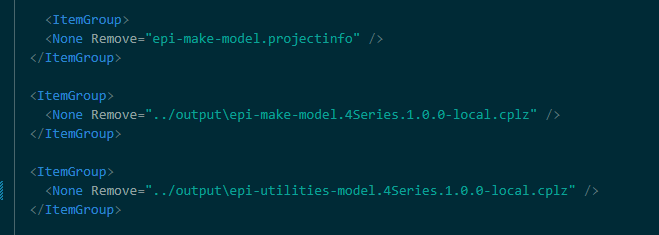
-
Add runtime exclusion:
Add<ExcludeAssets>runtime</ExcludeAssets>to the PepperDash EssentialsPackageReference.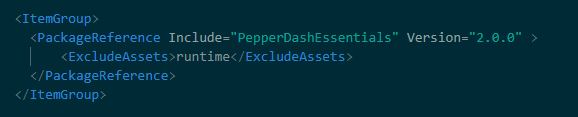
-
-
Copy Build Files:
- Copy
src/Directory.Build.propsandsrc/Directory.Build.targetsfrom TR. - Update
RepositoryUrlinDirectory.Build.propsto match nuspecPackageProjectUrl. - Remove "template" text from
<Product>inDirectory.Build.propsas needed.
- Copy
-
Clean Up:
- Delete old Visual Studio 2008 files:
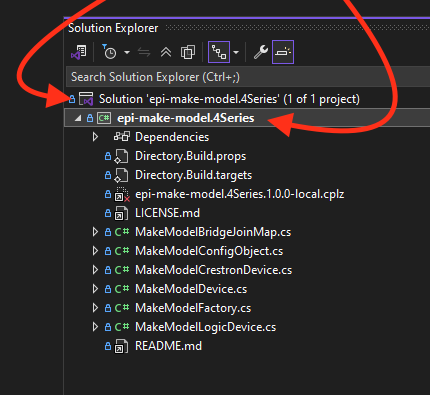
.sln,.suo,.nuspec,.csproj,.csproj.user,.projectinfo. - Ensure file structure matches below example:
- Delete old Visual Studio 2008 files:


  ├── src/
  │   ├── Directory.Build.props
  │   ├── Directory.Build.tagets
  │   ├── *.3Series.csproj
  │   └── *.4Series.csproj
  ├── .releaserc.json
  ├── *.3Series.sln
  ├── *.4Series.sln
  ├── LICENSE.md
  └── README.md
-
Rename Solution/Project as needed.
-
Update Project References and Dependencies
- Remove old PepperDash Essentials dependency.
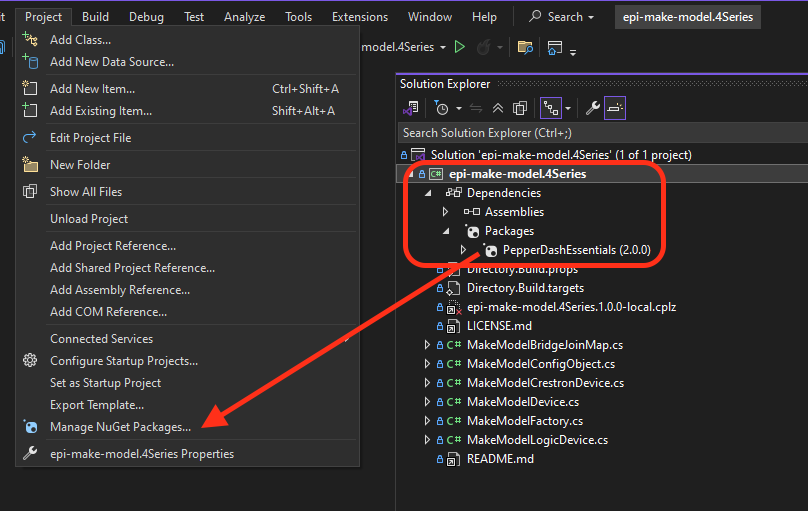
- Add PepperDash Essentials v2.x dependency via Visual Studio 2022 > Project >
Manage Nuget Packages.
-
Update Factory Class:
SetMinimumEssentialsFrameworkVersionto match the Essentials version dependency. -
Build Solution:
Ensure solution compiles (warnings about obsoleteDebug.Consolecalls are OK). -
Update Debug Calls:
ReplaceDebug.ConsolewithDebug.Logmethods as appropriate (see table).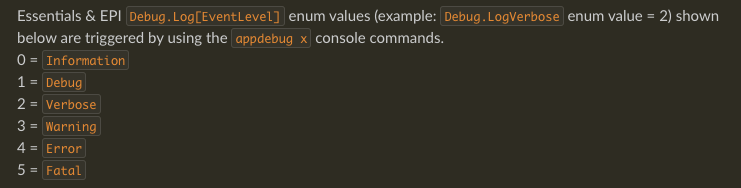


Completion Checklist
- EPI compiles with no warnings.
- Obsolete methods updated to modern equivalents.
- Workflows complete successfully; packages generated via GitHub and NuGet.org.
readme.mdincludes:- Usage/setup instructions
- Example SIMPL Windows bridge joinmap
- Example device communication structure/properties
- EPI tested against full release Essentials version.
- EPI tested by another developer.
- Full release of EPI.
For questions about workflows or customizations, consult with PepperDash Team.